NOTE: This is for Cities XXL only.
Howdy all. By now you've probably gotten your grubby little hands on Cities XXL. For those who want to upload your mods to the Steam Workshop here is how you do it.
Step 1: Open the UGCManager located in your Cities XXL folder...
Hello and welcome on board!
Make sure you are not running the game!
1) choose your game:
2.1: XL (2012 and Platinum)
2.2: XXL
2.1: Cities XL (2012 and Platinum):
Disk or Steam?
2.1.1: Disk:
2.1.1.1: If you used the standard path for the installation, then go to C:\Program Files\Focus Home...
Step 1: Locate GlobalSettings.cfg in Cities XXL/Data/Config/
Step 2: Open GlobalSettings.cfg
Step 3: Search for the phrase: <!-- Visibility Manager -- > and you will find this: <VisibilityEnabled>2</VisibilityEnabled> and change it to <VisibilityEnabled>0</VisibilityEnabled>.
Now when you...
Easy tutorial in few words and images :D (Compatible with Cities XXL too).
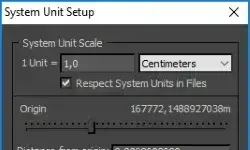
1. Customize > Units SetUp > Metric > Meters
2. System Unit Setup > 1 Unit = 1 Centimeters > OK